Isometric Hand Icons: A Versatile Visual Toolkit
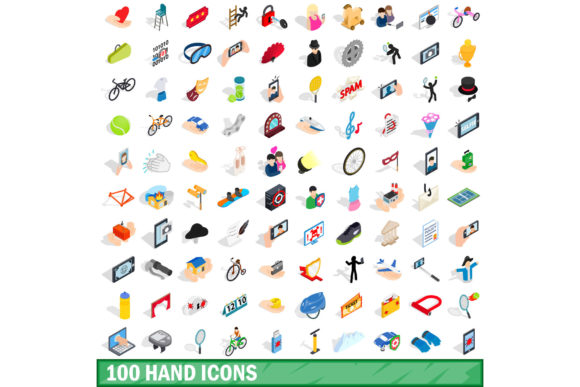
Visual communication has shifted far beyond flat, two-dimensional graphics. Designers, content creators, and business owners alike are seeking depth, dimension, and a sense of realism that captures attention. The 100 Hand Icons Set, Isometric 3d Style offers exactly that: a collection of hand gestures and actions rendered in a three-dimensional, angled perspective. Unlike standard icon sets, these isometric visuals bring a tactile, almost tangible quality to digital and print projects. Whether you are building a website, designing an app interface, or preparing a presentation, understanding what this set offers and how it fits different needs can save you time and help you make a smarter creative decision.
What Makes This Icon Set Different
Isometric design uses a fixed angle—typically 30 degrees—to create the illusion of three dimensions on a flat surface. This style has become popular because it feels modern, approachable, and slightly playful without being cartoonish. The 100 Hand Icons Set, Isometric 3d Style includes a wide range of common hand signals: pointing, waving, holding, thumbs up, okay signs, gripping, reaching, and many more. Each icon is built with consistent lighting, shading, and perspective, which means they work together seamlessly in a single project.
What sets this collection apart from generic icon packs is the sheer variety of gestures included. One hundred distinct icons cover everything from simple finger points to complex hand poses used in communication, education, and interface design. For anyone who has tried to find a single high-quality isometric hand icon online, the frustration of limited options is real. This set eliminates that problem by offering a library that feels complete.
Why Different Audiences Care About Isometric Hand Icons
The value of an icon set shifts depending on who you are and what you are building. A marketer, a teacher, a developer, and a hobbyist each look at the same collection through a different lens. Let’s explore how various people might evaluate and use this set.
Designers and Visual Creators
If you are a graphic designer, illustrator, or UI/UX professional, you likely care about consistency and versatility. An isometric hand icon set that includes 100 variations means you can maintain a unified visual language across a whole project. For example, when designing a tutorial interface for a software tool, you might need icons for click, swipe, drag, hold, and tap. Having all those gestures in the same isometric style keeps the interface clean and professional.
Experienced designers also value editable formats. If the set comes with source files such as SVG, EPS, or Figma components, you can adjust colors, resize without losing quality, and integrate them directly into your workflow. The flexibility to modify icons for branding or accessibility—like increasing contrast for low-vision users—adds long-term usefulness. Beginners entering the design field can also benefit by studying how the icons are constructed, learning about lighting, shadow placement, and isometric grid techniques in a hands-on way.
Marketers and Brand Strategists
For marketers and brand managers, first impressions matter. A website or social media post that uses flat, generic icons can feel dated. Isometric graphics, by contrast, appear more polished and engaging. Using the 100 Hand Icons Set, Isometric 3d Style in landing pages, email newsletters, or product demos can subtly signal that your brand pays attention to detail. A health and wellness brand, for instance, might use hand icons for meditation instructions, gesture-based app guides, or wellness check-in features. The dimensional look adds warmth and human touch without needing actual photography, which can be expensive and inconsistent.
Speed is another consideration. Marketing timelines are often tight. Having a ready-to-use set of 100 icons means you can skip the custom illustration step and focus on messaging and strategy. The cost of purchasing a well-designed set is usually far lower than hiring a designer to create custom hand icons from scratch, especially when you need multiple variations.
Educators and Trainers
Teachers, online course creators, and instructional designers often use visual aids to explain concepts. Hand gestures are especially useful in language learning, sign language basics, communication skills, or even physical therapy guides. An isometric hand icon can show a specific gesture more clearly than a photograph, because the stylized form removes distractions like skin tone, nails, or background clutter.
For example, an educator creating a module on nonverbal communication could use icons for pointing, waving, crossing arms, or giving a thumbs up to illustrate different meanings across cultures. Because the icons are consistent in style, learners focus on the gesture itself rather than visual noise. Beginners in instructional design will appreciate not having to create these visuals manually, while experienced educators can repurpose the icons across slides, handouts, and digital platforms without worrying about format compatibility.
Small Business Owners and Entrepreneurs
Running a small business often means wearing many hats, including that of designer and content creator. Budgets are limited, and every purchase must earn its keep. A set like this can be a cost-effective investment because it serves multiple purposes: website icons, social media graphics, product labels, and even printed signage. A local coffee shop could use hand icons on a menu board to indicate size (small, medium, large) or to highlight customer favorites with a thumbs up. A freelance consultant might use them on a pitch deck to illustrate key action points during client presentations.
Reliability matters for business owners. The icons should look good on a smartphone screen, a tablet, a laptop, and a printed flyer. Isometric icons with proper resolution and scalable formats handle all these scenarios. The ability to use the same set across different media creates a cohesive brand identity without needing a full-time designer.
Hobbyists and Personal Creators
Not everyone using this icon set is a professional. Hobbyists who enjoy scrapbooking, digital journaling, or creating personal websites may find the isometric hand icons add a polished touch to their projects. You might be building a simple portfolio site for your photography, or creating a visual resume. Hand icons can be used as bullet points, navigational elements, or decorative accents. For someone exploring design as a hobby, the set offers a low-cost way to experiment with professional-grade assets without a steep learning curve.
Hobbyists often prioritize ease of use. If the icons are well-organized, clearly named, and available in common formats like PNG or SVG, the barrier to entry is low. You can drag and drop them into Canva, PowerPoint, or a basic HTML page without any advanced software knowledge. The creative satisfaction of seeing your project look more polished can be a strong motivator to keep learning.
Evaluating Quality and Practical Fit
When deciding whether this set matches your goals, consider a few key factors beyond just the number of icons.
- File formats and licensing: Check whether the set includes editable vector files (SVG, AI, EPS) and raster versions (PNG with transparent backgrounds). Licensing terms matter too—commercial use should be allowed if you plan to sell products or services using the icons.
- Consistency of style: Look at previews carefully. All icons should share the same isometric angle, lighting source, and level of detail. Inconsistent styling becomes noticeable when icons appear side by side.
- Coverage of gestures: Consider your specific use case. Does the set include the hand poses you actually need? A hundred icons is a large library, but if your project requires very specialized gestures (e.g., sign language letters), make sure those are included.
- Scalability and resolution: Isometric icons with intricate details may lose clarity when reduced to very small sizes on mobile interfaces. Test a few icons at the sizes you intend to use to ensure legibility.
- Color customization: Some isometric sets come with flat colors, while others include gradients and shading. If you need to match a brand palette, adjustable colors in vector format are a big advantage.
Practical Examples Across Use Cases
Let’s take a few concrete scenarios to see how the 100 Hand Icons Set, Isometric 3d Style might be applied day-to-day.
A freelancer building a portfolio website could use a pointing hand icon as a call-to-action button on their contact page. The dimensional style makes the button feel interactive even before any CSS hover effect. A blogger writing about productivity might use a checklist hand icon next to each tip to visually separate points. Online course creators can replace generic bullet points with a series of hand gestures that guide students through steps: first icon for introduction, second for main content, third for summary.
A small business owner preparing a product catalog might place a holding hand icon next to items that are currently in stock, and a crossed-out hand icon to indicate sold-out items. This simple visual cue helps customers navigate quickly without reading fine print. Meanwhile, a marketing team producing a series of Instagram carousels could use hand icons to lead the viewer from one slide to the next, creating a visual flow that feels intuitive and modern.
Does This Set Match Your Needs?
To answer that question honestly, start by looking at your current project and skill level. If you are a beginner with limited design experience, a set that includes ready-to-use PNGs and a simple naming system will be more practical than one that requires software like Illustrator or Figma. If you are a professional designer, editable vectors and a comprehensive gesture library will matter more.
Consider the long-term value. A hundred-icon set can serve multiple projects over months or years. If your work regularly involves interfaces, presentations, or educational materials, the upfront cost is likely justified. For a one-time, simple project, you might prefer a smaller, cheaper set, or even free alternatives. But if you anticipate needing hand icons repeatedly, a complete set saves you from piecemeal searches later.
Also think about the audience you are designing for. Isometric graphics tend to appeal to audiences familiar with modern digital interfaces—tech-savvy users, younger demographics, or professional environments. For a very traditional brand or an older audience, a simpler flat icon style might feel more appropriate. Knowing your end user helps you choose the visual language that resonates best.
The 100 Hand Icons Set, Isometric 3d Style occupies a sweet spot: it is large enough to be a comprehensive resource, styled consistently enough to maintain visual harmony, and versatile enough to adapt across many contexts. Whether you are a seasoned creator or just starting out, understanding what you need from an icon set before you buy ensures that your final project looks intentional, professional, and engaging. Take the time to preview the set, test a few icons in your actual layout, and confirm the licensing matches your intended use. With those checks in place, you can confidently add a polished visual layer to your next creative endeavor.