Mastering Scooter 3D Rendering for Background Design
In the world of visual content creation, the humble scooter has become an unexpectedly powerful storytelling tool. Whether it is an electric scooter gliding through a futuristic cityscape or a classic kick scooter resting in a sun-drenched park, scooter 3D rendering for background use has emerged as a specialized niche in digital art, marketing, and entertainment. This article demystifies the process, explores its real-world relevance, and shows you how to leverage it effectively—whether you are a designer, a marketer, or simply someone curious about how digital backgrounds come to life.
What Is Scooter 3D Rendering for Background Use?
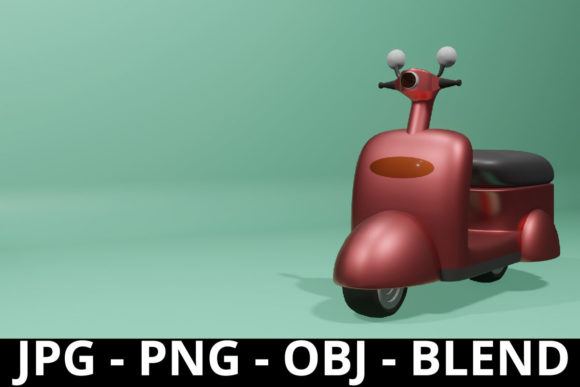
At its core, scooter 3D rendering refers to the process of generating a photorealistic or stylized three-dimensional model of a scooter using computer graphics software. When we talk about using it for background, we mean that the scooter is placed in a scene where it supports the main subject—adding context, depth, and atmosphere without stealing the spotlight. Think of a movie still where a scooter leans against a wall in a narrow alley: the vehicle tells you something about the setting, the era, and the lifestyle of the characters, even if no one is riding it.
Unlike hero product renders that showcase every detail of a scooter in isolation, background renders prioritize environmental integration. The scooter becomes part of a larger visual narrative. This distinction is crucial for anyone creating content for websites, advertisements, video games, or virtual staging.
Why Scooters? The Unexpected Power of a Simple Vehicle
Scooters carry cultural and practical weight. They are symbols of urban mobility, youthful freedom, and eco-conscious living. In a background render, a scooter can instantly communicate:
- Urban density: A row of parked scooters suggests a bustling city where space is premium.
- Sustainability: Electric scooters in a background align with green lifestyles and smart city initiatives.
- Leisure and recreation: A colorful scooter on a beach path evokes holidays and carefree moments.
- Economic accessibility: Scooters are often more affordable than cars, hinting at a budget-conscious or student environment.
By choosing a scooter as a background element, you anchor your scene in a specific socioeconomic and cultural context without needing to explain it in words.
The Core Workflow: From Model to Background
Creating a convincing scooter 3D render for a background involves several stages. Understanding this workflow helps you appreciate what goes into a good render and how to judge quality when commissioning or selecting assets.
1. Modeling the Scooter
Every render starts with geometry. The artist builds the scooter's frame, wheels, handlebars, deck, and sometimes small details like reflectors or brake cables. For background use, the level of detail can be slightly lower than for a hero shot, but key proportions must be accurate. A misshapen wheel or an oddly angled stem will break the illusion, even in the background.
2. Texturing and Materials
Textures give the scooter its look: metallic paint, rubber grips, plastic fenders, and brushed aluminum. For background renders, textures should match the lighting and mood of the scene. A matte, worn scooter works well in a gritty urban alley, while a glossy, pristine model fits a clean tech showroom. PBR (Physically Based Rendering) materials are standard because they react realistically to light.
3. Lighting Integration
Lighting is where background renders live or die. The scooter must catch shadows and highlights that match the environment. If the background has warm sunset light, the scooter's metal surfaces should reflect those golden tones. Artists often use HDRI (High Dynamic Range Imaging) maps to light the scene with real-world light data, ensuring the scooter blends seamlessly with its surroundings.
4. Placement and Composition
In background use, composition rules change. The scooter should not be centered. Instead, it sits off to the side, partially obscured, or placed at a depth where it remains readable but not distracting. A common technique is to place the scooter in the foreground-to-midground zone, creating a sense of depth as the viewer's eye moves past it toward the main subject.
5. Post-Processing
Final touches include depth of field blur, color grading, and adding subtle environmental effects like dust particles or lens flares. These tie the scooter into the background and make it feel like it belongs there photographically.
Practical Applications Across Industries
Scooter 3D rendering for background use is far from a niche hobby. It serves real business and creative needs across several fields.
Marketing and Advertising
Imagine a print ad for a ride-sharing app. The main copy promotes the service, but the background shows a sleek electric scooter parked next to a subway entrance. This visual supports the message of convenient, last-mile connectivity. Similarly, real estate renderings often include scooters in street scenes to make neighborhoods feel vibrant and walkable.
Video Game Environments
Open-world games set in cities or campuses use 3D scooters as props that populate streets. They make the world feel lived-in. In games like Cyberpunk 2077 or GTA V, background vehicles—including scooters—are carefully rendered to match the setting's visual style, even if the player never interacts with them.
Film and Animation Previsualization
During pre-production, filmmakers use 3D renders to block out scenes. A scooter placed in the background of a virtual set helps the director see how a street corner will read on camera. This saves time and money before any physical set is built.
E-Commerce and Product Visualization
Some retailers sell accessories that attach to or complement scooters (phone mounts, helmets, locks). A 3D-rendered background showing a scooter in a realistic context—say, a commuter scene—helps customers envision the product in use. This drives higher conversion than plain product shots.
Architectural Visualization
Architects rendering a new residential complex often add scooters to the plaza or bicycle parking areas. This humanizes the design and shows that the space is intended for modern, active lifestyles. It also hints at lower traffic congestion, which is a selling point for many home buyers.
Common Misunderstandings About Background Renders
Many people assume that background elements require less care than main subjects. This is a mistake. A poorly rendered scooter in the background can drag down the entire image. Here are a few misconceptions clarified:
- "Background means low quality is fine." Actually, the human eye is surprisingly good at detecting fake geometry or bad lighting in peripheral areas. Render quality must remain consistent across the entire frame.
- "Any generic scooter model will do." Context matters. A vintage Vespa works for a nostalgic Italian piazza but looks wrong in a futuristic tech hub. Choose models that match the time, place, and mood of your scene.
- "You can just Photoshop a photo of a real scooter." While compositing real photos is possible, 3D renders offer control over lighting, camera angle, and perspective that photos cannot match. Rendering from scratch ensures perfect alignment with the virtual background.
- "Scooters in backgrounds are only for urban scenes." Not true. Scooters appear in suburban driveways, college campuses, resort pathways, and even in indoor settings like shopping malls or train stations. Their versatility is part of their value.
Best Practices for Using Scooter 3D Renders in Backgrounds
Whether you are creating the renders yourself or purchasing them from a library, keep these guidelines in mind to maximize impact.
Match the Lighting Temperature
A scooter rendered in cool, blue daylight will clash with a warm, golden-hour background. Use lighting tools to tint the scooter's highlights and shadows to match the scene. Consistency in color temperature is non-negotiable.
Control Depth of Field
If the main subject is in sharp focus, the scooter in the background should be slightly softened with blur. This mimics a real camera lens and prevents the scooter from competing for attention. Use a subtle gaussian blur or lens blur effect based on distance.
Keep It Contextual
Ask: "Would a scooter realistically be here?" A scooter on a busy highway shoulder makes no sense. But one outside a coffee shop, next to a bike rack, or tucked beside a staircase—these feel natural. Let logic guide placement.
Use the Scooter to Guide the Eye
Compositionally, the scooter can act as a leading line. For example, if the scooter is angled slightly, its handlebars or wheels can point toward the main subject. This subtle directional cue improves visual flow.
Choose the Right Level of Detail
For a background element seen at a distance, you do not need inner cable routing or tread patterns on tires. Focus on the silhouette, overall color, and simple materials. For midground scooters, add more definition. Let the distance dictate your polygon budget.
The Future of Scooter 3D Rendering in Backgrounds
As real-time rendering engines like Unreal Engine and Unity continue to improve, scooter 3D models will appear in more interactive contexts—virtual showrooms, AR filters, and live-streamed events. The line between background and interactive asset will blur. Artists will also begin using AI-assisted modeling to generate scooter variations quickly, though human oversight will remain essential for quality control.
Furthermore, the rise of digital twins for cities means that accurate scooter models may soon populate virtual replicas of real streets. Urban planners will use these renders to simulate traffic flow, parking needs, and safety scenarios. The background scooter is evolving from a visual decoration into a data point.
Bringing It All Together: A Simple Example
Let us imagine you are creating a background for a website promoting a new coworking space. The main subject is a laptop on a desk. In the background, beyond a window, you place a 3D-rendered electric scooter parked on the sidewalk. It is slightly blurred, bathed in the same daylight as your interior, and angled so the viewer's eye moves from the scooter up toward the laptop. Without a single word, you have communicated that the coworking space is located in a modern, bike-friendly neighborhood—and that the members are mobile professionals who value efficiency.
That is the quiet power of scooter 3D rendering for background use: it does not demand attention, but it shapes perception.
Conclusion
Scooter 3D rendering for background use is a nuanced skill that sits at the intersection of art, technology, and psychology. By understanding how to model, texture, light, and place a scooter within a scene, you gain a tool for telling richer visual stories. Whether you are designing a game level, staging a real estate render, or building a brand identity, the scooter can deliver context and mood without a word. Start with accurate geometry, respect the lighting, keep placement purposeful, and you will create backgrounds that feel both authentic and intentional.
The next time you scroll past an image of a city street and notice a scooter leaning against a lamppost, pause. That scooter was likely placed there on purpose, by a 3D artist who understood that even the smallest background element can shape how you see the world.