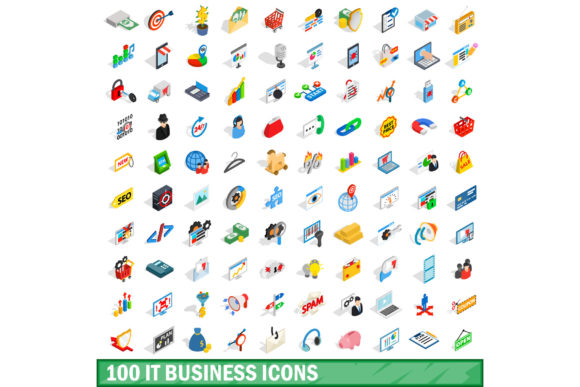
Unlock Your Visual Communication with the 100 IT Business Icons Set
In today's fast-paced digital landscape, clear and professional visuals can make or break a project. Whether you're designing a presentation, building a website, or crafting a marketing campaign, the right icons communicate complex ideas instantly. Enter the 100 IT Business Icons Set — a carefully curated collection that blends utility with style. But what exactly makes this set stand out, and how can it transform your work? Let's dive in from a practical perspective, grounded in real experience and focused on your needs rather than hype.
A Closer Look at the 100 IT Business Icons Set
This icon set is a bundle of one hundred meticulously designed symbols covering a wide range of IT and business concepts. From cloud computing and cybersecurity to project management and data analytics, each icon is crafted to be both intuitive and aesthetically consistent. Unlike generic icon packs that mix random topics, this set focuses specifically on the intersection of technology and commerce. It makes a targeted resource for professionals who need to convey modern business tech themes without visual noise.
The design language prioritizes clarity. For instance, the icon for "Artificial Intelligence" uses subtle neural network cues rather than a clichéd robot head. The icon for "DevOps" combines gear and code symbols in a way that instantly resonates with developers. This thoughtful approach means your audience grasps meaning at a glance, reducing the cognitive load in presentations or UI screens.
Features That Matter in Daily Use
- SVG and PNG formats — scalable vectors for any screen or print resolution, plus ready-to-use PNGs for quick drops.
- Three consistent styles — line, flat, and filled options so you can match your brand's visual tone without mixing mismatched sets.
- Semantic naming and folder organization — find "API", "Dashboard", or "Artificial Intelligence" in seconds, not minutes.
- Optimized file sizes — web-ready without bloating page loads, and print-ready at 300 DPI.
These features directly impact your workflow. As a designer, you can drop the SVG files into Figma or Sketch without adjusting stroke weights or dealing with broken paths. As a marketer, you can embed icons in email campaigns without worrying about load times or distortion on retina displays.
Where Can You Use the 100 IT Business Icons Set?
The versatility of this collection is one of its strongest selling points. Let's examine real-world scenarios that highlight its practical value.
- Corporate Presentations — Replace generic stock clipart with relevant icons to illustrate topics like digital transformation, cloud migration, or team collaboration. The consistent style makes slides look cohesive and professional.
- Website and App Interfaces — Use icons in navigation menus, feature sections, or call-to-action buttons. The set covers "Login", "Settings", "Notifications", and "Analytics" — all essential for a modern dashboard.
- Infographics and Reports — Visualize data points like revenue growth, system uptime, or security threats. Icons for "Data", "Security Shield", and "Growth Chart" are included, making complex information digestible.
- Marketing Collateral — Elevate brochures, landing pages, and social media posts. The 100 IT Business Icons Set provides icons for "Email Marketing", "CRM", "Automation", and more, ensuring brand consistency across channels.
Each application benefits from the set's laser focus on business IT. A SaaS company can quickly find icons for API, Dashboard, Automation, Customer Support, and Billing — all in one place, without mixing styles from different sources.
Who Benefits Most from This Icon Set?
While anyone can use icons, specific groups find the 100 IT Business Icons Set indispensable.
- UX/UI Designers — Save hours of searching for the right symbol and maintain visual harmony across multiple screens. The consistent stroke weight and rounded corners match modern design systems.
- Project Managers — Create clear process diagrams and explain technical concepts to stakeholders without jargon. Icons for "Agile", "Sprint", "Kanban", and "Milestone" are available.
- Entrepreneurs and Startup Founders — Bootstrap your website with professional-grade visuals that would otherwise cost hundreds to custom-design. The set immediately boosts your brand's credibility.
- Educators and Trainers — Develop course materials for subjects like IT management, digital business, or cybersecurity. Icons for "Network", "Hardware", "Software", and "User Training" make slides engaging.
The set bridges the gap between technical accuracy and creative flexibility, enabling non-designers to produce professional-looking materials without a steep learning curve.
Strengths and Limitations — An Honest Review
No tool is perfect. Understanding both sides helps you make an informed decision before you invest your time or money.
Strengths
- Highly relevant to modern IT and business contexts — you won't waste time weeding out unrelated icons.
- Consistent design language across all 100 icons — no jarring style clashes even when you use multiple symbols together.
- Easy integration with popular design tools like Figma, Sketch, Adobe XD, and even Microsoft Office.
- Affordable compared to custom iconography — you get a hundred assets for a fraction of the cost of buying them individually or hiring a designer.
Considerations and Limitations
- Limited to one hundred icons — if your project covers highly niche or legacy topics (e.g., mainframe systems or specific ERP modules), you may need additional icons.
- Styles may not match every brand's aesthetic — the set leans modern and clean; if your brand uses a very ornate or extremely minimalist design, you might need to adjust colors or line widths.
- Basic vector editing skills recommended — while PNGs are ready to use, getting the most out of SVGs (like changing stroke colors) requires familiarity with software like Illustrator or Figma.
For most typical projects — a startup website, a corporate deck, or an internal tool dashboard — these limitations are minor. The strengths far outweigh them, especially when you consider the time saved.
Comparing the 100 IT Business Icons Set to Alternatives
You might wonder: how does this set stack up against free icon libraries like Material Icons or generic premium packs? Free libraries often lack business-specific symbols — try finding a good "CI/CD Pipeline" or "Bookkeeper" icon there. Generic premium packs may include hundreds of icons, but you pay for many you'll never use, and the quality can be inconsistent. The 100 IT Business Icons Set cuts through the noise by offering only what you need in a unified style. It is not the cheapest option per icon, but the relevance and consistency save you from spending extra on custom modifications or wasted time.
Practical Guidance — How to Evaluate If This Set Suits Your Needs
Before purchasing or downloading the 100 IT Business Icons Set, ask yourself these questions:
- Do your projects frequently involve IT infrastructure, software, or business processes?
- Will you need multiple styles (line, flat, filled) for different contexts like presentations versus web UI?
- Are you comfortable using vector formats, or do you primarily need PNGs? (The set offers both.)
- Does the icon count align with your scope — small to medium projects generally fit 100 icons well; large-scale applications with many screens may require supplemental sets.
If you answered yes to most, this set is a smart addition to your toolkit. If you need hundreds of icons covering all possible topics, consider combining this set with a foundational collection like Font Awesome — but keep the 100 IT Business Icons Set for your core tech-business needs.
Real-World Example — Streamlining a Product Launch
Imagine you are launching a new project management tool. You need icons for features like timeline, board view, analytics, team chat, integration, and security. Instead of scouring free icon sites with inconsistent quality, you open the 100 IT Business Icons Set. Within minutes, you find all relevant icons — "Timeline", "Kanban Board", "Analytics Dashboard", "Chat Bubble", "Plugins", and "Lock Shield". You drop them into your mockup and maintain a polished, unified look. The time saved could be hours, and the professionalism gained is immediate. Your developers appreciate the semantic naming in the SVGs, making it easy to reference in code.
Tips for Maximizing the Set's Potential
- Customize colors — The SVGs are built with easy-to-edit fills and strokes. Adjust them to match your brand palette in seconds.
- Combine styles — Use line icons for navigation and filled icons for call-to-action areas to create visual hierarchy.
- Pair with typography — The clean, modern shapes complement fonts like Inter, Roboto, or Open Sans. Test combinations to ensure legibility.
- Document your usage — Create a small brand style sheet showing which icons correspond to which features. This helps teams maintain consistency.
Conclusion — Why This Icon Set Deserves a Spot in Your Library
The 100 IT Business Icons Set is more than a collection of pretty images. It is a strategic asset that communicates expertise and clarity. By focusing on the nexus of information technology and business, it fills a specific need that general icon sets often miss. Whether you are a freelancer, a marketer, a coder, or an educator, having a set of reliable, well-designed icons at your fingertips can elevate your work and simplify your process.
Consider exploring a reputable source for this set — look for vendor pages that offer previews, licensing details, and sample use cases. When used thoughtfully, these icons become an integral part of your visual vocabulary, helping you tell better stories without extra effort. Check the 100 IT Business Icons Set demo to see how it fits your workflow before making a decision.